
Laatste update: 02/11/2026
Your consumption alone doesn’t say much. A forty-room hotel naturally uses more than a four-room B&B. To make a comparison possible, the platform divides your consumption by your occupancy. Without occupancy figures, there is no footprint and no benchmark.
Where to find it
- Open your accommodation and go to the Years tab.
- Click to open the year and then click ✏️ Edit.
- In the Edit period window, enter room nights and person nights, or click Import from Statbel.
In the same window, you’ll also find the checkboxes for laundry and for charging electric vehicles.
Room nights and person nights
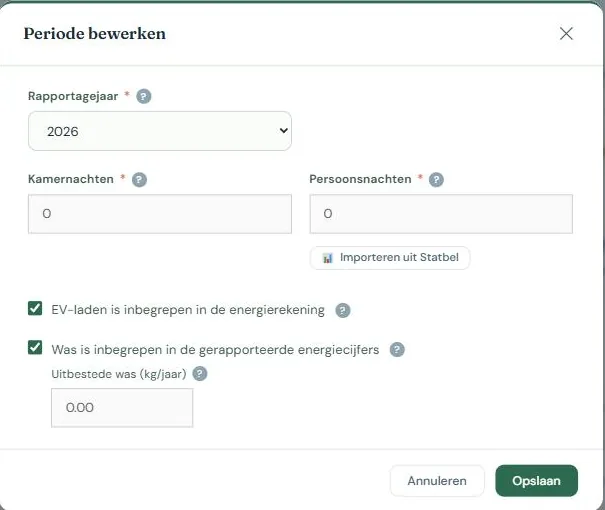
Two numbers, both covering the entire reporting period.
Room nights is the number of rooms that were occupied, multiplied by the number of nights. Three rooms that were each occupied for ten nights gives 30 room nights.
Person nights is the number of guests multiplied by the number of nights they stayed. A family of four staying for three nights gives 12 person nights.
Your footprint is expressed in both: per person per night (pppn) and per room per night (prpn). Person nights are fairer for comparing different accommodations, while room nights say more about how efficiently your building is running.
Fill in both if you have them. If you only have one, the platform will work with what you have, but part of the comparison will be lost.
Occupancy per month
In the Edit period window, there is a button 📅 Occupancy per month. This opens twelve rows for room nights and person nights, with a running total and its own save button. As soon as there are monthly figures, your annual total is the sum of those months, and it grows with every month you add. For a current year, this is therefore a year-to-date figure. This is fine: you cannot publish the current year yet anyway.
If a month remains empty while later months are filled in, you will receive a warning. Usually, that month has been forgotten, meaning your annual total is too low. If you were actually closed that month, you can proceed.
If you are a seasonal business, check This year is fully entered as soon as all the months you were open are in there. Then the platform knows that the empty months are not forgotten months, and the warning disappears.
The platform never automatically adjusts a published year. If you want to change the annual total there, you do so in the period form, and the year will then be unpublished.
Import from Statbel
If you report your accommodation figures to Statbel monthly, you don’t have to retype anything. You upload the Statbel PDFs and the platform puts each month in its place under the monthly occupancy. Your annual total is the sum.
You will first see what happens per month: new, will be adjusted, unchanged or remains, with the current and new figures side by side and the consequence for your annual total. The figures are only applied once you confirm. Months not in your files remain as they are, so you can safely upload a single month later. Uploading the same file twice does not count double. If something isn’t right, you can correct it manually.
If the files belong to a different year than the one you are editing, the platform will warn you in that proposal.
If you manually entered the annual total for an unpublished year without monthly figures, and then upload one month, your annual total will become the sum of the months—meaning just that one month. The proposal shows this beforehand with both figures. In that case, upload all months or fill in the missing months yourself.
Statbel counts a stay in the month the guest departs. This makes almost no difference to an annual total, but it does at a monthly level: a stay ending on January 2nd counts entirely towards January. Therefore, monthly figures per person night are only indicative.
The uploaded files are stored with your accommodation and are only visible to you and the people you share the accommodation with.
Manual entry
If you don’t have a Statbel declaration, you enter the two numbers yourself. Sources that are usually sufficient: your booking system, your guest register, or your tourist tax declaration.
When in doubt, it’s better to be conservative than too generous. Occupancy figures that are too high make your footprint look artificially favorable, and you’ll be comparing yourself against an incorrect figure.
Laundry and electric vehicle charging
Two checkboxes that affect your footprint:
- Laundry included. If you do the laundry yourself, that consumption is included in your energy figures. If you outsource it, it isn’t, so you specify the number of kilograms of outsourced laundry. This keeps the comparison fair against accommodations that do their own laundry.
- EV charging included. If guests charge their cars at your place, that electricity is in your meter reading even though it has nothing to do with your accommodation. By indicating this, the platform can take it into account.
Who sees your occupancy figures
Only you and the users you explicitly share this accommodation with. They never enter the benchmark as an individual figure: only the result per person night is counted anonymously. See Comparing without revealing your data.
Common mistakes
- Swapping room nights and person nights. Person nights is almost always the larger number.
- Only filling in the summer. The figures must cover the entire reporting period, including the months you were closed.
- Entering the number of bookings instead of the number of nights. A booking of four nights counts as four.

