
Laatste update: 02/11/2026
Invoices, inspection certificates, an EPC, your environmental policy: documents substantiate what you fill in. You save them once and link them to the year, the measurement, or the label criterion they belong to.
Where to find it
- Choose your accommodation in the overview or in the bar at the top.
- Click on Documents. This button is located both on the map in the overview and in the bar at the top of the screen.
- The document file opens over your screen; so you don’t leave your work.
If you want to attach a document to a single measurement, use the document button on the row of that measurement in the Energy or Water tab.
Opening the document file
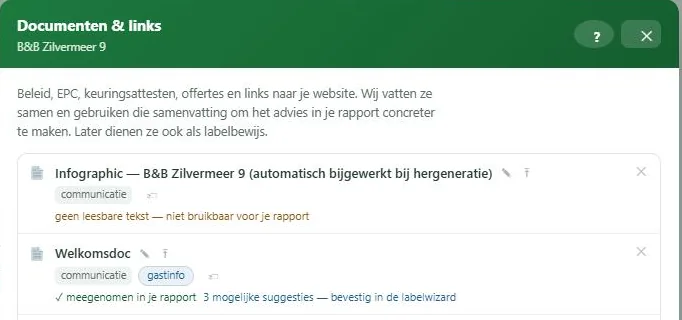
Documents have their own screen, which you open from any module. So you don’t leave your work.
Upload a file or register a link
Two possibilities. You upload a file, or you register a link to something that is already online. A link is just as valid as evidence and takes up no storage space.
When adding, you specify a target type and optionally a description. The target type says what kind of document it is: an invoice, a certificate, an EPC, a policy document.
Validity and versions
Documents expire. You can provide a valid until date, so you can see when something expires. For an EPC, ten years is suggested.
If you replace a document, use the button for a new version instead of deleting the old one. The previous version remains in the history, so that evidence you provided last year remains correct.
Tags
A tag says what a document is about: energy, water, policy, communication. The platform suggests tags based on the content, you confirm or adjust. These tags determine where the document can serve as evidence later.
What the automatic analysis does
When adding, the platform reads the document and creates a short summary: what kind of document it is, from when, and what it contains per theme. This summary later feeds your report and the label advice.
The analysis never claims that something complies. It makes suggestions, and you confirm.
The comparison with the label criteria only happens if a label trajectory is open for your accommodation. Statbel files that you upload for your occupancy are not summarized: their figures are already in your occupancy.
If you upload a Green Key audit report, the platform recognizes it and reads the criteria as soon as a label trajectory is open. The file then states, for example, “Green Key report read: 123 criteria, 90 with yes”. You can read about what that yields in the certification module under The wizard: answering criteria.
Having a scanned document read
If your PDF is a scan without text, the platform has it read by an AI. A scan of up to 30 pages happens automatically, in the background; this may take a while. If the scan is longer, there is a button to start the reading. Reading costs computing power and therefore energy and money, hence that limit.
If you are working on a label and the platform finds possible evidence for a criterion in the scan, you will receive an email. See Emails you may receive.
Documents with a measurement
In addition to documents of the accommodation or of a year, you can attach a document to a single measurement, for example the invoice on which that figure appears. One invoice can be attached to multiple measurements.
Who sees your documents
You and the people with whom you share the accommodation. Documents are never included in the benchmark. The AI analysis runs at a provider on renewable energy. See Comparing without revealing your data.
Delete
If you delete a document that is attached to multiple places, it will only be disconnected from that one context. Only when no connection remains does the file truly disappear. If a document substantiates a label criterion, you will receive a warning about it.

