
Laatste update: 02/11/2026
For each energy source and water type, you enter what you consumed that year. The platform automatically converts everything to kWh and kg CO₂e, so you don’t have to calculate anything yourself. Those CO₂ figures also include the extraction and transport of the fuel, not just the combustion at your location; see How we calculate. You can find the measurements in the footprint screen, under the year they belong to, in the Energy and Water tabs.
If you have an EnergyID account, read Automatic entry via EnergyID first. Then you won’t have to do most of this manually.
Adding an energy measurement
The entry form is located below the table with existing measurements. You fill in:
Energy type. Choose from the list, for example Electricity (Grey), Gas, or Own solar energy. The type determines which emission factor is used for the calculation, so choose accurately. If you are unsure between Electricity (Grey) and Electricity (Green with GOs), check the renewable percentage.
Unit. The selection list only populates after you have chosen a type, and only shows the units applicable to that type. You enter heating oil in liters or kilograms, pellets in kilograms. If there is only one possible unit, it will be selected automatically.
For gas, kWh is the only unit. That figure is on your annual statement. Your gas meter shows cubic meters, but the conversion to kWh depends on the composition of the gas and varies by region and month. Your grid operator has already performed this conversion correctly on your invoice, so we use that instead of estimating it ourselves.
Input. Two buttons: Annual total or Per month. Annual total is the standard method. Per month is optional and described under Consumption per month.
Quantity. The number as it appears on your invoice or meter reading. The chosen unit appears behind the field, so you can see what you are entering.
Meter number. Optional. Useful if you have multiple meters of the same type, for example two inverters of different brands. It does not affect the calculation.
If you save a measurement in a year that has already been published, the platform will first ask for confirmation. See Publishing.
Heat pump: entering SCOP
If you choose Heat Pump as the type, an additional mandatory field appears: SCOP. This is the seasonal coefficient of performance, or how much heat your pump delivers on average per unit of electricity. An SCOP of 3.5 means 3.5 kWh of heat per 1 kWh of electricity.
You can find this figure on the technical data sheet or on your installer’s quote. Without the SCOP, the platform cannot calculate which part of your heat counts as renewable.
Wood or pellets
If you burn wood or pellets, choose Biomass (wood/pellet) and enter your fuel consumption. If you have a heat meter (calorimeter) on your boiler, you can also choose Biomass with heat measurement and enter the heat delivered in kWh.
Use only one of the two for the same boiler. If you enter your fuel for the second type, or your heat for the first, your total will no longer be correct.
The difference lies in the strict renewable percentage according to EPC/NR: there, heat from biomass only counts if it is measured. For your CO₂ and your regular renewable percentage, biomass counts in both cases. See How we calculate.
Solar panels: yield and injection
There are two separate types for solar panels, and you need both if you feed back into the grid:
- Own solar energy is the total yield of your panels, including the part you consume yourself. You can find this figure in your inverter’s app.
- Electricity injection to grid is the surplus you have fed back. This is on your statement or on Mijn Fluvius.
If you only enter the injection, you underestimate your own production. If you only enter the yield, the part fed back is incorrectly counted as your own consumption.
Entering injection is not a minor detail. The electricity you feed back is subtracted from your consumption. If you leave it out, your total will be too high and your renewable part will be too high, so your renewable percentage will be incorrect in two ways. You can find the figure on Mijn Fluvius. See How we calculate.
Present but not measurable
Sometimes you have an energy source where you cannot measure consumption, for example a wood stove where you don’t know how much you’ve burned. In that case, check Not measured this year. The quantity field will then be disabled.
The source then counts as unknown instead of zero. That is more accurate: zero would mean you consumed nothing, which would distort your renewable percentage and your CO₂ figure.
Reading the table
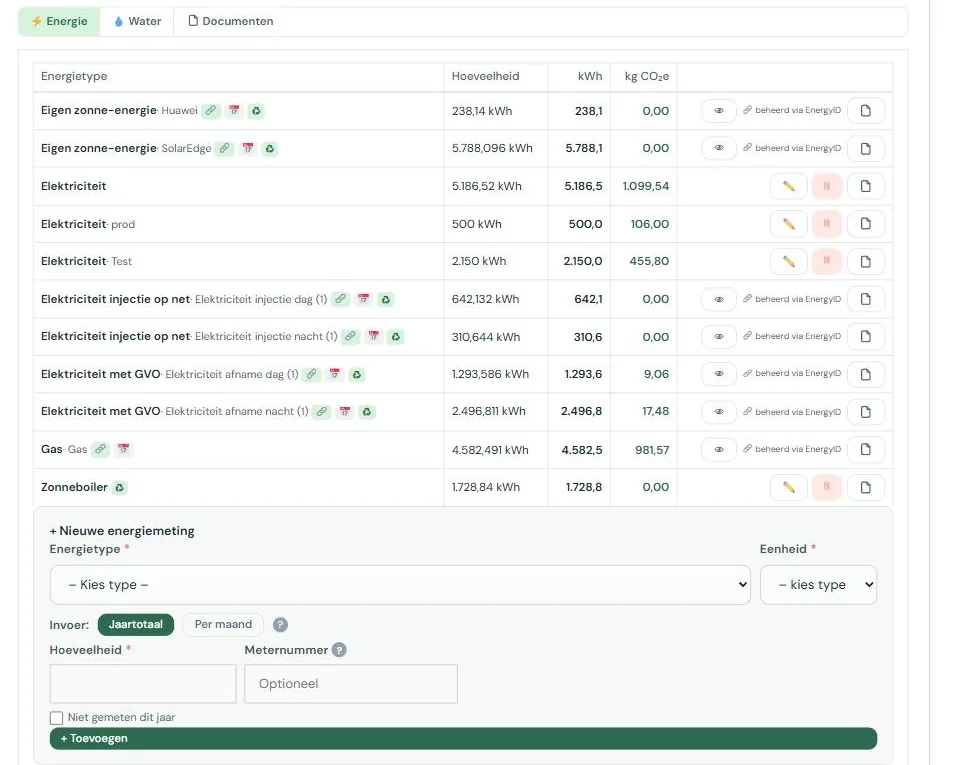
The table shows the energy type, the quantity, and what the platform calculated from that in kWh and kg CO₂e for each measurement. Small symbols may appear behind the name:
| Symbol | Meaning |
|---|---|
| 🔗 | Automatically filled from EnergyID |
| 📅 | The annual total is the sum of the entered months |
| ♻ | Counts as renewable |
| ⚠ | This type has both manual and EnergyID data; both are counted, so possibly double |
| EPC X | This energy type cannot be processed in the EPC/NR calculation |
| X not measured | Present, but consumption is unknown |
That orange triangle deserves attention. It means that for the same energy type, you have both a manual measurement and an EnergyID measurement. The platform adds them both up, so your annual total is then likely too high. In that case, remove the manual measurement, or remove the meter in the EnergyID block.
Water measurements
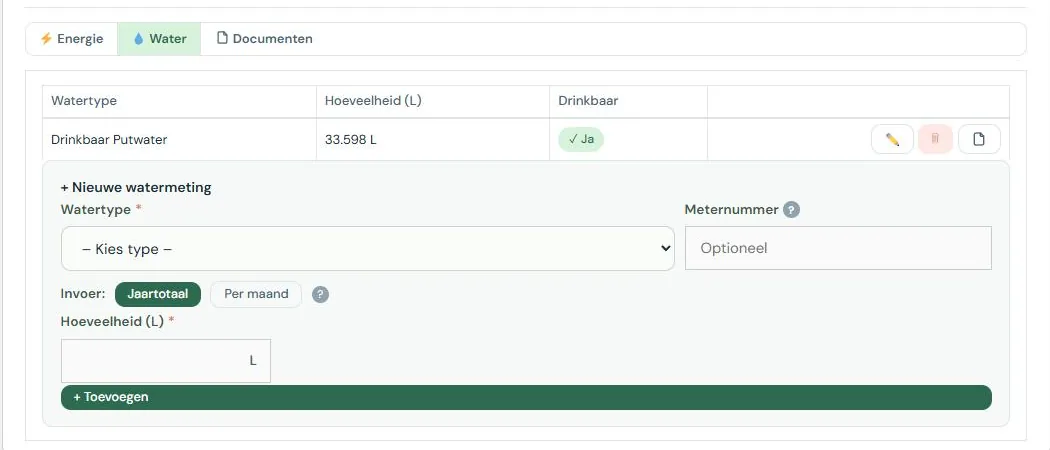
The Water tab works the same way, with three differences. You choose a water type instead of an energy type, the unit is fixed at liters, and the table shows a Potable column instead of kWh and CO₂e.
Drinking water, rainwater, and groundwater are separate types. That distinction matters: the benchmark primarily looks at your drinking water consumption, because using rainwater instead of drinking water is exactly what you want to achieve.
On your water bill, consumption is usually stated in cubic meters. One m³ is 1,000 liters.
Changing or deleting measurements
Behind each manual measurement are three buttons: edit, delete, and a document button with a counter. Use the latter to attach an invoice or meter reading to the measurement. See Documents and evidence.
Measurements managed by EnergyID cannot be edited or deleted. They show “managed via EnergyID” and an eye button to view the monthly data. If you still want to adjust such a measurement, first remove the meter in the EnergyID block.
Common mistakes
- Entering the number from your gas meter instead of your invoice. The meter shows cubic meters, the platform expects kWh. The difference is roughly a factor of twelve, so this will stand out in your results. Copy the annual consumption in kWh from your statement.
- Forgetting injection. Without an injection figure, it looks like you consumed all your solar power yourself.
- Entering part of the year. A measurement should always cover the full reporting period. If you only have part of it, use the monthly entry.
- Including private consumption without filling in the private percentage. If you live in the same building, check if the private use percentage in your accommodation details is correct.

