
Laatste update: 02/11/2026
After logging in, you’ll arrive at the overview: all your accommodations side by side, with the key figures for the most recently published year for each. From there, you can go to each tool.
The overview cards
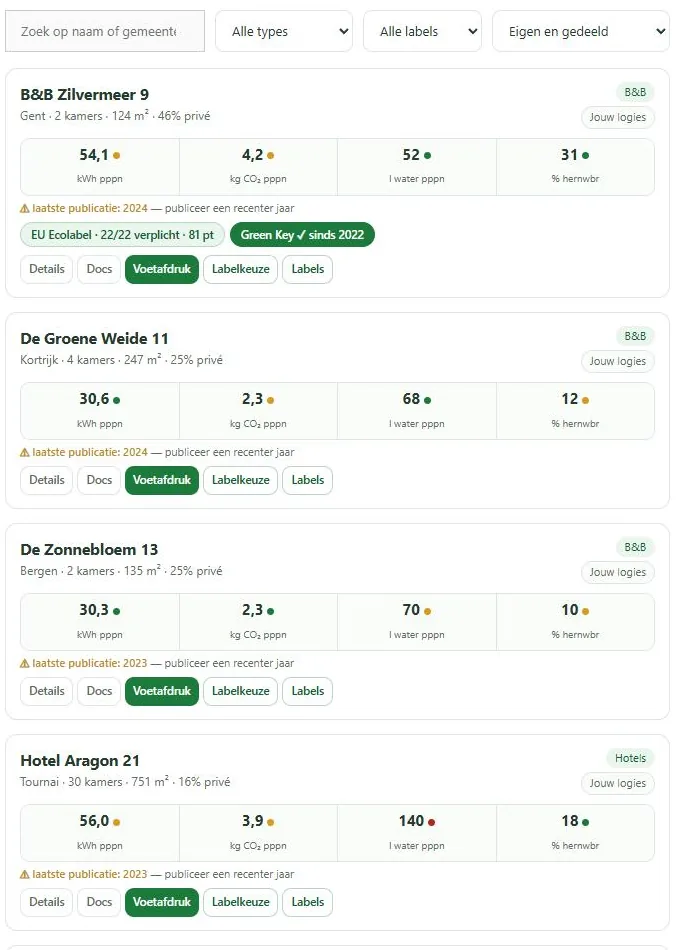
Each accommodation is a card. It shows the name, type, and whether you are the owner or if it has been shared with you. Next to that are the most important figures from your last published year, and which labels you have.
If you don’t have any accommodations yet, you’ll see a card to add one.
What the key figures mean
You see your consumption per person per night and your share of renewables. Behind those figures is a colored dot: it tells you how you score compared to similar accommodations. Green is among the top third, orange is middle of the pack, red is the bottom third.
That dot comes from the same calculation as the detail screen, so what you see here matches what you’ll find further on.
For many accommodations, the score is only calculated when you request it, using a button at the top. This saves processing power for cards you might not view.
The year line
Below the figures, it shows which year is being displayed. If your last publication is older than the previous year, you’ll see a gentle warning that there is a more recent year to publish.
Filtering
If you have many accommodations, you can filter by label and by owned or shared, and search by name.
The context bar
As soon as you choose an accommodation, a bar appears at the top with the name of that accommodation. It stays there while you navigate through the tools, so you always see what you’re working on. You can also switch accommodations in that bar.
The Labels button only appears on the overview card and in the context bar if a label process is open for that accommodation. Until then, the path to the labels is through the label selection. See Access to the process.
On a narrow screen, the bar becomes more compact, with icons instead of full buttons.
Switching accommodations
Via the context bar or by going back to the overview. The platform remembers which accommodation you last chose, so next time you’ll be in the right place immediately.

