
Laatste update: 02/11/2026
An accommodation is the starting point for everything. Your footprint, your choice of label, and your certification file are all linked to it. You create it once and then keep it up to date.
Where to find it
- On the overview, click on Details next to the accommodation you want to adjust.
- If you don’t have an accommodation yet, click Add accommodation on the map.
- At the bottom of the page is the Manage this accommodation block, with options for exporting, sharing, and deleting.
Adding an accommodation
On the overview screen, there is a map with a button to add an accommodation. You enter your address and let the system retrieve the data.
Automatic retrieval via Visit Flanders
Based on your address, the platform looks up your accommodation in the Visit Flanders register and copies the name, type, number of rooms, and your recognition. This saves typing and ensures your data matches the official registration.
This same check determines whether you can publish. If your accommodation is not found, check your street, number, and postal code and try again.
Core data
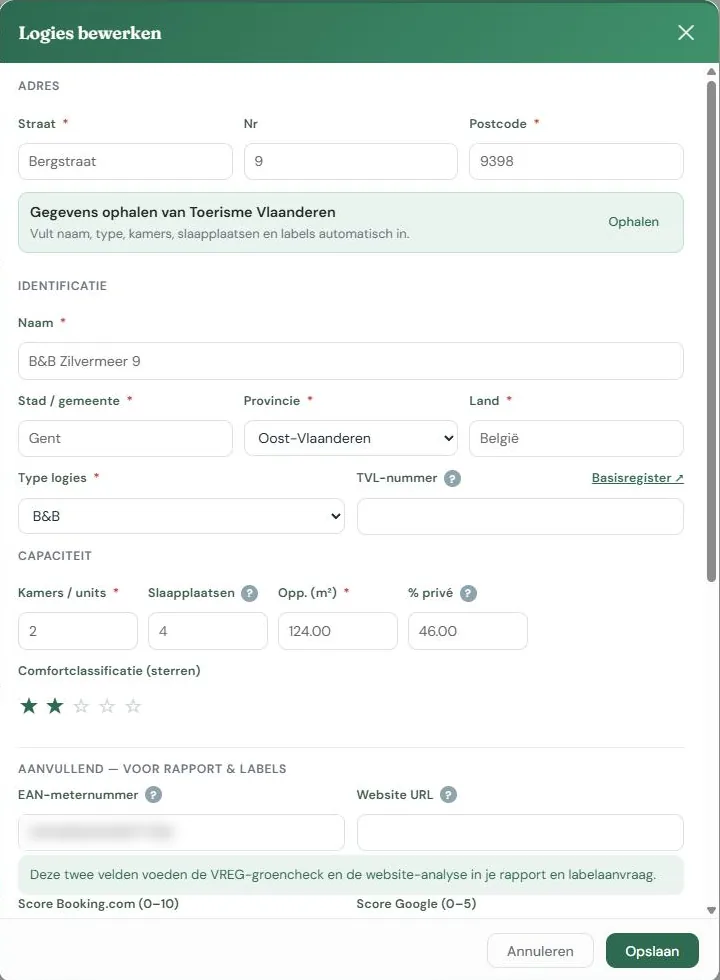
Name, type (B&B, hotel, holiday home, etc.), address, number of rooms, and number of beds. These usually come from the automatic retrieval; you can adjust them.
Surface area and percentage of private use
The surface area is the living space of the building in m².
The percentage of private use is crucial if you live in the building yourself. If you occupy 60 of the 200 m², you enter 30%, and that part is excluded from your consumption. If you don’t fill this in while living there, your accommodation will appear to consume much more than it actually does. See How we calculate.
EAN number and website
Both optional, both useful. With your EAN number, the platform can check if you purchase green electricity. With your website, the AI analysis can look at how you currently communicate about sustainability and where it can be improved.
Labels already obtained
If you already have a label, check it and enter the year you obtained it. This is possible for Green Key and EU Ecolabel. It will appear in your report, help the label selection tool provide sensible advice, and the certification module will determine whether an EU Ecolabel application is a first-time application or a renewal.
For the EU Ecolabel, there is also a date field applied for on. The platform uses this to calculate your biennial reporting to the competent authority (criterion 5.2: within two years of the application, and every two years thereafter). Fill in the date even if you have had the label for a longer time; the platform will calculate your next deadline. The field is separate from the checkbox: if you have applied for the label but haven’t received it yet, the clock is already running. See The dashboard.
Editing the accommodation later
Everything remains adjustable. If your number of rooms or private percentage changes, adjust it; it will apply to new calculations from that moment on.
If you change something that affects the calculation while a year is already published, the platform will first ask for confirmation. Such a change can unpublish the published year. See Publishing.
Manage this accommodation
In the Management block, you will find export, share, and delete. Delete is separate and comes with a warning, as it also removes your years, measurements, and documents.

